
Digital signage | Digital menus and in-store advertising displays
Cloud-updated content replaces printed posters and menus for restaurants and retailers.
For: restaurants · Local diners · Fast food · Cafes · Shops · Waiting rooms
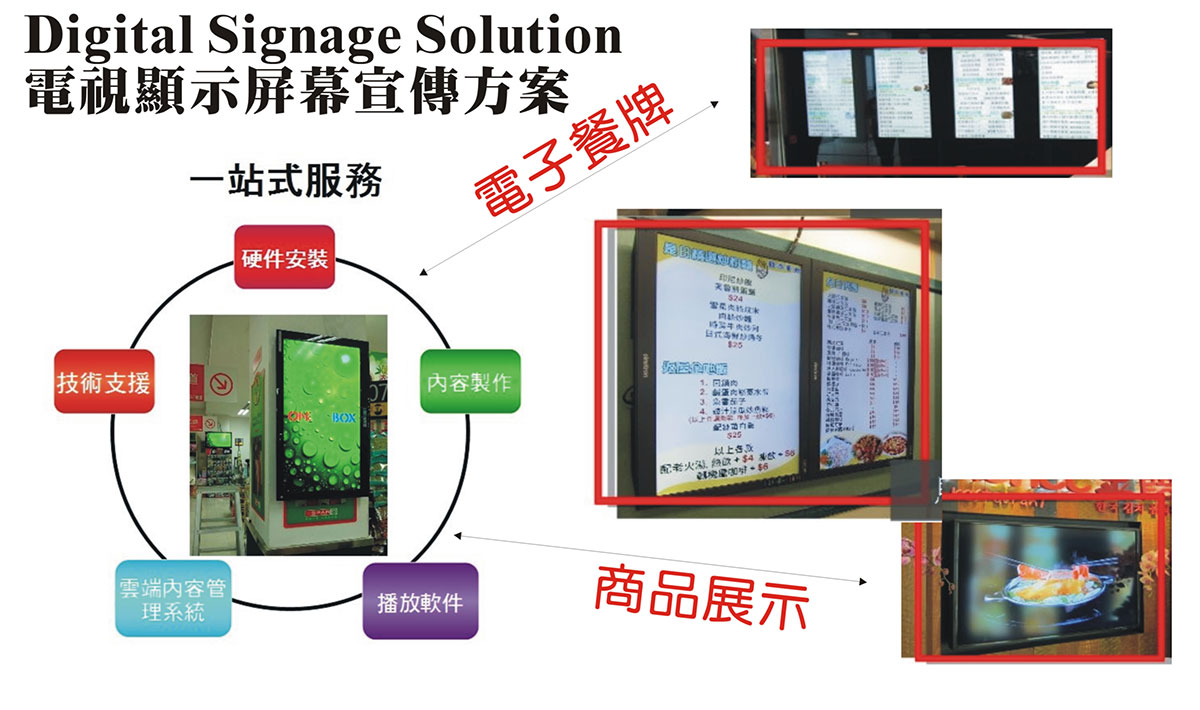
Digital displays are a multimedia platform using cloud delivery to show video, audio, images and text. Content-management software lets you change playback dates and times and update material whenever needed.
(For restaurants and retail)
Reduce manual work and replace poster and menu printing costs with a convenient, flexible and paper-saving approach. Our one-stop service can also arrange restaurant and retail POS systems , merchant card terminal and Octopus payments .
- Cloud delivery and remote content updates
- Video, audio, images and text
- Flexible playback dates and times
- Replace poster and menu printing costs
What is digital signage?
Digital signage turns shop TVs or displays into promotional tools. Upload content from a computer or phone and send it through the cloud, without printing new posters or menus each time.
Its main difference from printed material is that content can change at any time : update prices, products and limited-time offers within minutes, or schedule content to play automatically.
Main digital signage features
Cloud delivery
Send content to shop screens without visiting to swap USB drives. Multi-branch businesses can manage content centrally or tailor it by branch.
Multimedia playback
Supports video, audio, images and text. Motion can attract more attention than static posters, ideal for food preparation, product introductions and brand stories.
Scheduled playback
Set dates and times in the management software: breakfast in the morning, lunch sets at midday, afternoon tea and dinner suggestions, switching automatically.
Update at any time
Update prices, sold-out items, new products and holiday promotions immediately, without waiting for printing or manually replacing posters.
Printed posters and menus vs digital displays
| Comparison | Printed posters and menus | Digital display screens |
|---|---|---|
| Content changes | Redesign and reprint | Instant cloud updates |
| Staff effort | Manual replacement and posting | Remote operation reduces manual work |
| Ongoing costs | Printing costs for every change | Replaces poster and menu printing costs |
| Content formats | Static images and text | Video, audio, images and text |
| Time-of-day changes | Manual replacement | Automatic scheduled playback |
| Environmental impact | Significant printing waste | Less paper use |
| Multi-branch consistency | Deliver and replace at each branch | Central management and simultaneous updates |
Restaurant uses: digital menus and promotions
Digital menus
- Switch menus automatically for breakfast, lunch, tea and dinner
- Update prices and sold-out items immediately to avoid disappointing orders
- Use clear photos and clips of signature dishes to encourage ordering
- Promote sets and add-ons to increase average spend
Entrance and waiting-area screens
- Show featured dishes at the entrance to attract passers-by
- Display menus in waiting areas so guests can decide before seating
- Promote online bookings alongside Optitable reservation management
Supporting restaurant operations
Screens encourage ordering, a restaurant POS system handles orders and kitchen tickets, and payments use Wireless card terminal and Octopus payments . Restaurants can also explore official Octopus offers; see Octopus restaurant offers .
Retail uses: in-store digital advertising
- New products: Product videos and demonstrations attract more attention than static posters
- Limited-time offers: Schedule weekend prices, seasonal sales and holiday promotions
- Member recruitment: Show offers for downloading MRM membership app to encourage sign-ups
- Brand image: Show brand stories and lifestyle videos
- Multi-branch consistency: Head office updates centrally so promotions match across branches
Retailers can combine screens with Retail POS system membership and points features, advertising benefits on screen and registering members at checkout.
Commercial display or home TV?
Many merchants first consider a cheaper home TV, but the designs differ. Check the following before choosing:
| Comparison | Home television | Dedicated commercial display |
|---|---|---|
| Brightness | Usually around 250–400 nits, suited to a living room | Can reach 800 nits or more for bright environments |
| Continuous operation | Most are not designed for long continuous use | Designed for 18/7 or 24/7 operation |
| Long-duration risks | Overuse may cause overheating, burn-in or premature failure | Lifespans can reach 50,000 hours |
| Anti-glare | Less common | Many have anti-glare panels |
| Suitable use | Shorter daily playback in dimmer locations | Long playback near windows or in bright areas |
*Figures refer to BenQ Hong Kong's comparison. Actual specifications depend on the model.
If you already have a TV, we recommend compatible players or smart-display options based on your equipment or purchase plans.
Screen content planning tips
- Large text, few words: Customers may look for only seconds; make the message immediately clear
- One focus per slide: Promote one offer or product on each screen
- Schedule by time: Keep content relevant and fresh throughout the day
- Add a call to action: For example, “Scan to download our membership app” or “Book online for an offer”
- Show payment methods: Display accepted cards, Octopus and wallets so customers can prepare and speed checkout
- Refresh regularly: Regulars stop noticing content that runs unchanged for too long
Example screen content
| Time | Restaurant content | Retail content |
|---|---|---|
| Morning | Breakfast sets and takeaway collection | New arrivals |
| Midday | Lunch sets and quick ordering | Lunchtime offers |
| Afternoon | Afternoon tea and desserts | Member recruitment |
| Evening | Dinner suggestions and online bookings | Upcoming weekend events |
Music and videos on shop screens: copyright
If content includes background music or music videos, consider copyright. Intellectual Property Department guidance says public performance, playing or showing of music in malls, shops and restaurants requires appropriate permission from owners or licensing bodies, usually charged annually.
| Organisation | Represents |
|---|---|
| Composers and Authors Society of Hong Kong (CASH) | Composers, lyricists and publishers; public-performance rights in music and lyrics |
| Hong Kong Recording Industry Alliance (HKRIA) | Record companies; public playing and showing of sound and video recordings |
| Phonographic Performance (South East Asia) Limited (PPSEAL) | Record companies; public playing and showing of sound and video recordings |
- Depending on who owns the recordings, licences from both HKRIA and PPSEAL may be needed
- PPSEAL notes that buying a sound or video recording does not grant public-playback rights
- Use your own footage and designs or properly licensed assets to reduce copyright risk
*General information only, not legal advice. Ask the relevant licensing bodies for details.
Combine with other merchant services
Restaurant POS · Retail POS
Screens promote; POS handles orders, checkout, tables, stock and membership points.
Explore POS systems →HKT Biz Wi-Fi
Reliable internet supports cloud updates, with coordinated login-page and screen promotions.
Explore business Wi-Fi →MRM membership app
Promote app downloads on screen, then retain customers with stamps and coupons.
Explore membership apps →Card terminal applications
Compare wired, wireless and mobile merchant terminals supporting Visa, Mastercard and UnionPay.
Explore card terminals →For card transaction and monthly fees, see our complete card terminal charges guide ; for Octopus applications, see Octopus electronic payment services ; for wallets, explore Allinpay .
Steps to introduce digital displays
- Understand your needs: Will screens show menus, entrance advertising or in-store offers? How many are needed?
- Assess equipment: Check whether existing TVs suit the purpose or commercial displays and compatible players are needed.
- Confirm connectivity: Cloud updates need reliable internet, potentially combined with business Wi-Fi .
- Prepare content: Collect menus, product photos, videos and offers, checking usage rights.
- Set schedules: Arrange playback by time and date.
- Keep updating: Refresh regularly to match seasons and promotions.
FAQs: digital signage
Does a promotional display need a dedicated player?
Generally a compatible player or smart-display solution is required. We recommend equipment based on existing TVs or purchase plans.
Can content be updated remotely?
Yes. Cloud management supports scheduled dates and times and remote updates to images, video and text, reducing poster printing costs.
Can I use a home TV?
Yes, with limitations. Typical brightness is 250–400 nits, and most are not designed for continuous operation; overuse can cause heat, burn-in or early failure. Commercial displays may reach 800 nits or more and support 18/7 or 24/7 use. Consider commercial equipment for long hours or bright locations.
What are the benefits of digital menus?
Update prices and dishes at any time, switch automatically between meal periods, promote sets and new products, and avoid reprinting costs and manual work.
Do shop screens need music copyright licences?
Yes. Intellectual Property Department guidance requires permission for public music performance, playing or showing in malls, shops and restaurants. Relevant local bodies include CASH, HKRIA and PPSEAL.
Which industries suit digital displays?
Restaurants, local diners, fast-food shops, cafes, retailers, salons, clinic waiting rooms and education centres that need to show customers information.
Can screens show payment methods?
Yes. Display accepted methods such as cards, Octopus and wallets so customers can prepare and checkout faster.
Can multiple branches be managed centrally?
Cloud software supports central updates and scheduling, with shared or branch-specific content depending on the selected plan.
Can I arrange displays, POS and payment equipment together?
Yes. Our one-stop service can quote together for displays, restaurant or retail POS , merchant card terminal , Octopus and business broadband.
More questions? Contact us for a quotation or browse all service options .
Want to plan screens, POS, terminals and Octopus together? Leave your details for a prompt quotation.
Request a quote