

HKT Biz Wi-Fi | Shop guest Wi-Fi and login-page promotions
Provide customer Wi-Fi and promote offers through the login page. Separate guest and internal networks help protect payment equipment and POS.
For: restaurants · Cafes · Shops · Beauty salons · Waiting rooms · Education centres
Internet access on phones and tablets is part of everyday life, making customer Wi-Fi a basic shop service.
Choose HKT Biz Wi-Fi for wireless access plus free advertising features on the login page to promote offers and encourage spending. Our one-stop service can also arrange merchant card terminal applications , Octopus payments and POS system so connectivity, payments and checkout are planned together.
- Configure a branded login page
- A choice of promotional advertising layouts
- Customer product-browsing reports
- Help grow revenue and business
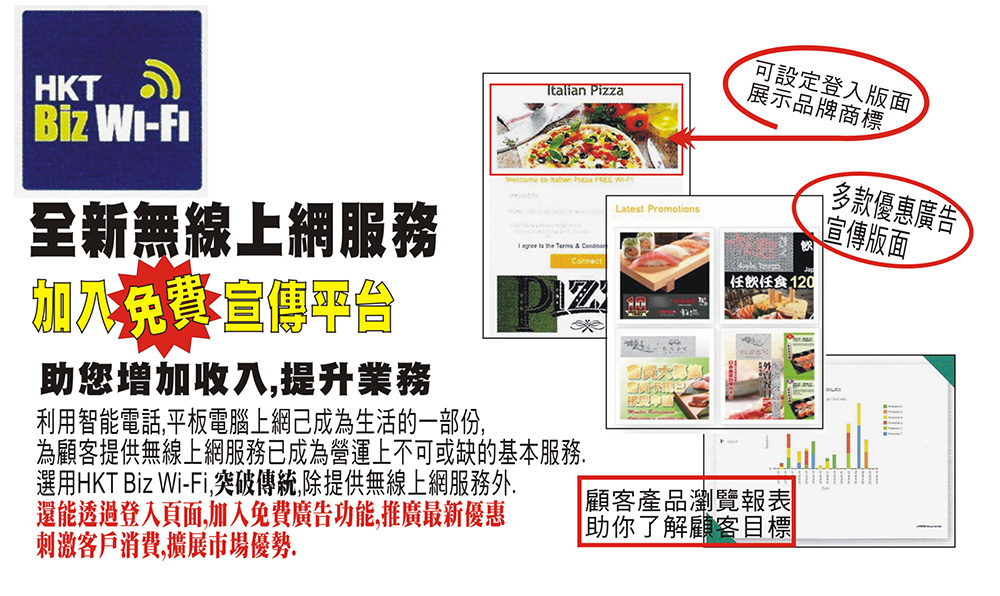
Main HKT Biz Wi-Fi features
HKT describes Biz Wi-Fi as a reliable solution for SME wireless offices and an opportunity for retail and food-service merchants. High-speed Wi-Fi attracts customers, while the landing page supports promotions and interaction.
1. Custom login-page promotions
Show current news and offers when customers connect, with links to your website or social channels. Promote the brand and learn about customer preferences through interaction.
2. Separate internal and guest networks
Keep customer access separate from business devices to protect internal information and avoid interference.
3. Manage customer turnover
Set daily connection durations, frequency limits and passwords to meet customer needs while maintaining table turnover, particularly during busy restaurant and cafe periods.
4. Central cloud management
Manage equipment centrally, monitor usage in real time and analyse customer traffic and promotion click rates. HKT states the platform can also remove upfront equipment configuration and related maintenance costs.
5. Permissions and bandwidth allocation
Allocate network usage and access permissions according to business needs to reduce security risks and improve efficiency.
*Feature source: HKT's official SME solutions website. Actual features depend on the package.
Login-page promotion: make Wi-Fi an advertising channel
Customers connecting to Wi-Fi are already in your shop and ready to spend. A well-designed landing page turns free Wi-Fi into effective in-store advertising.
| Objective | Example content | Related solution |
|---|---|---|
| Increase average spend | “Upgrade your meal for $18” or dessert and drink offers | restaurant POS system |
| Encourage repeat visits | A digital coupon for downloading the membership app | MRM membership app |
| Grow social followers | Links to Facebook and Instagram pages | Login-page links |
| Encourage bookings | “An offer for your next table reservation” | Optitable reservation management |
| Promote new products | Product photos and seasonal specials | digital displays coordinated promotion |
| Promote payment options | “Cards, Octopus and wallets accepted” | Allinpay , Octopus |
Login-page design tips
- Make your logo and brand colours immediately recognisable
- Focus on one or two clear offers at a time
- Set expiry dates and refresh offers regularly
- Change content by time, such as lunch sets or afternoon tea
- Use cloud click-rate data to refine promotions
*If personal data is collected for promotion, comply with the Personal Data (Privacy) Ordinance. See Member data privacy .
Guest Wi-Fi security: why separate networks?
Many shops display one Wi-Fi password for customers and staff. If customers' phones share a network with POS and checkout computers, an infected device could reach business systems.
Three HKCERT recommendations
- Separate staff and guest SSIDs: Create different wireless networks and configure staff and visitor access separately
- Separate wired and wireless traffic with a firewall: Place a correctly configured firewall between the networks
- Enable AP isolation: Where supported, isolate devices on the same wireless network and limit guest bandwidth
Shop network security checklist
- Display only the guest-network password
- Connect POS, checkout computers and printers to the internal network or wired connections
- Keep CCTV and monitoring devices off the guest network
- Do not publish the internal password, and change it regularly
- Cap guest bandwidth to protect business operations
- Update router and access-point firmware and change default administrator passwords
Biz Wi-Fi separates internal and guest networks and supports different permissions and usage limits to reduce security risks.
Reliable networks underpin terminals, Octopus and POS
Cloud POS synchronises sales, some terminals and Octopus readers transmit transactions online, and delivery tablets need stable connections. Unreliable access can delay payments during busy periods and cost sales.
| Equipment | Common connection | Related service |
|---|---|---|
| Traditional wired terminal | Telephone line or LAN cable | Card terminal applications |
| Wireless card terminal / smart payment terminal | Built-in SIM mobile data or Wi-Fi | Wireless card terminal , Allinpay |
| Octopus Reader 3.0 | Built-in wireless connectivity | Octopus reader applications |
| Portable Octopus Processor 2.0 | 4G network | merchant Octopus |
| Cloud POS | Wired broadband or Wi-Fi | Restaurant and retail POS systems |
| Reservation tablet | SIM or Wi-Fi | Reservation management |
| digital displays | Cloud content updates | Digital signage and display advertising |
New merchants arranging broadband, terminals and Octopus should book broadband first, as equipment testing often requires a ready connection. See New-shop opening checklist and Card terminal application guide .
Business vs home Wi-Fi
| Comparison | HKT Biz Wi-Fi business plan | Typical home Wi-Fi router |
|---|---|---|
| Login-page promotion | Custom branding, offers and social links | Usually unavailable |
| Network separation | Separate internal and guest networks | Model-dependent; requires manual setup |
| Connection management | Daily duration limits, connection counts and passwords | Limited features |
| Central management | Cloud platform with real-time monitoring | Configure each device separately |
| Analytics | Customer traffic and promotional click rates | Usually unavailable |
| Intended use | Merchant operations | Home use |
Industries suited to business guest Wi-Fi
- Restaurants, cafes and local diners: Connection limits help table turnover; landing pages promote meals alongside restaurant POS system
- Retail shops and mall units: Promote products and member offers alongside Retail POS system
- Beauty and hair salons: Promote treatments and products while customers wait
- Clinic waiting rooms: Offer internet access and display clinic information
- Education centres: Provide parent waiting-area access and promote new courses
- New small shops: Promote opening offers and social pages during a new shop's launch
Application and installation
- Send an enquiry: Provide the address, floor area, seating or customer traffic and existing broadband details.
- Assess the site: Review the layout and number of access points needed.
- Compare quotations: List package features, monthly charges and contract length alongside broadband options.
- Arrange installation: Coordinate work around opening or trading hours.
- Configure the login page: Prepare logos, offers and social links.
- Start using the service: Update content and view data in the cloud platform.
FAQs: HKT Biz Wi-Fi
How does Biz Wi-Fi differ from home broadband?
Business plans focus on guest access, branded landing pages and promotions, alongside network separation, connection limits and cloud management. Their purpose differs from home services.
Can customers see my offers when connecting?
Yes. The login page displays news and offers and can link to your website or social pages. Cloud traffic and click-rate analytics support marketing decisions.
Do I need a separate router?
It depends on the package and site. Provide your floor area and additional AP requirements. HKT states that cloud management can remove upfront configuration and related maintenance costs; actual arrangements follow the plan.
Can I limit customers' Wi-Fi time?
Yes. Set daily durations, connection counts and passwords to meet customer needs while maintaining table turnover.
Will guest Wi-Fi affect POS and payments?
Biz Wi-Fi separates internal and guest networks to protect internal information. In general, POS system , checkout computers and payment devices should use an internal or wired network, while customers use a bandwidth-limited guest network.
Why separate guest and internal networks?
If customers and business devices share a network, an infected customer device may reach POS, checkout computers and surveillance equipment. HKCERT recommends separate guest wireless networks and SSIDs, with a correctly configured firewall between wired and wireless networks.
Which businesses suit guest Wi-Fi?
Restaurants, cafes, shops, salons, clinic waiting rooms, education centres and any business where customers spend time can improve the experience and use Wi-Fi as a promotional channel.
Can I apply for broadband, Wi-Fi and terminals together?
Yes. We can quote together for business broadband, Biz Wi-Fi, merchant card terminal , Octopus and POS, coordinating installation dates.
More questions? Contact us for a quotation or browse Card terminal and Octopus FAQs .
Want to compare Biz Wi-Fi, broadband, terminals and Octopus together? Leave your details for a prompt quotation.
Request a quote