
Optitable reservations | Table bookings, visual seating and customer records
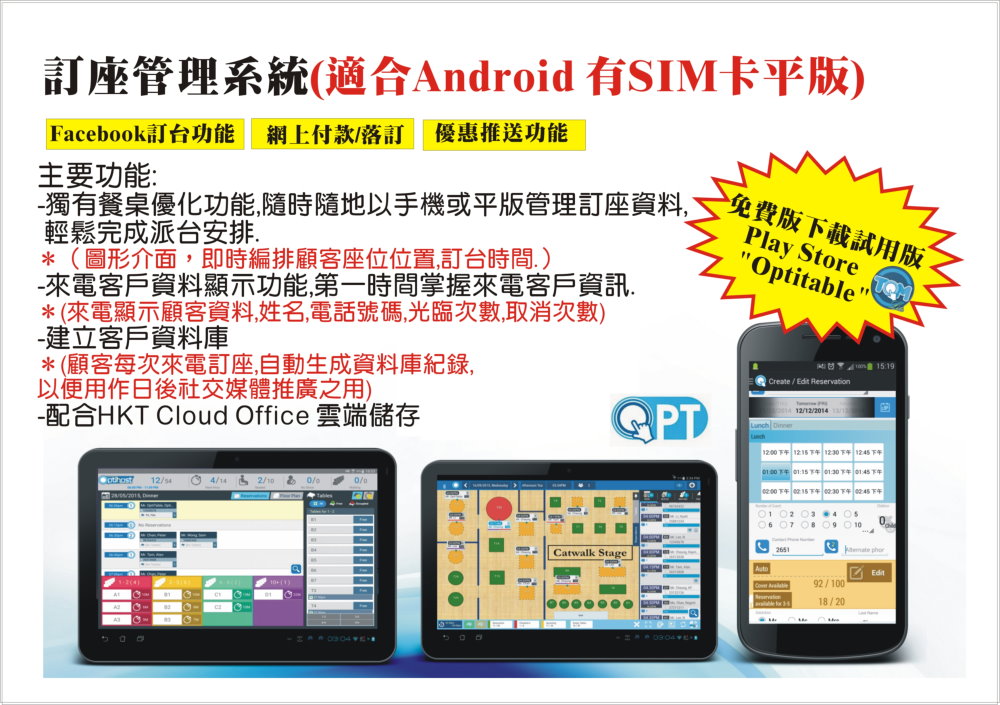
For SIM-equipped Android tablets, with visual seating and member data management. Plan alongside restaurant POS and payment equipment.
For: banquet restaurants · Chinese restaurants · Western dining · Hotpot · Japanese restaurants · Bars
- Facebook reservations
- Online payments and deposits
- Promotional notifications
- Optimised seating managed from a phone or tablet
- Visual interface for seating and booking times
- Caller ID with immediate customer information
- Detailed records: name, phone, visits and cancellations
- Automatically build a database for social media promotion
- Can work with HKT Cloud Office storage
Free trial: search “Optitable” on the Play Store
Why does a restaurant need reservation management?
Many restaurants still use a phone and paper diary: constant calls during busy periods, illegible entries, double-booked tables, no-shows and unrecognised regulars. Each affects revenue and the customer experience.
Reservation management combines bookings, seating, customer records and promotions on a phone or tablet, giving staff and managers a current view of tables while building the restaurant's own customer database.
- Avoid double bookings and missed entries
- See all tables in real time for efficient seating
- Recognise regulars and personalise service
- Collect deposits to reduce no-shows
- Build customer records for social media promotion
Optitable reservation features
Visual seating: tables and booking times at a glance
A floor plan shows occupied and reserved tables and when they will be free. Customise meal periods and seating capacity for different restaurant types and operating models.
AI Auto Assign
OptiTable's official website describes built-in AI that assigns table numbers with one “Auto Assign” click, reducing repetitive daily seating work and improving utilisation.
Caller ID with immediate customer information
When a regular calls, their name and history appear immediately. Staff can greet them by name and know their preferred table.
Detailed records: name, phone, visits and cancellations
Visit and cancellation histories are retained. Frequent cancellers can be asked for deposits, while regulars can receive priority or special offers.
Facebook and online reservations
Customers book through Facebook or an online page without calling, reducing staff phone duties. Set meal periods, party sizes and deposit requirements online.
Online payments and deposits
Require online deposits for particular periods, holidays or large parties to reduce late cancellations. For in-store card acceptance too, explore merchant card terminal applications .
Promotional notifications and social marketing
Build a customer database automatically for social media and offers. For a fuller membership scheme, combine with MRM membership app and its digital stamps and coupons.
HKT Cloud Office storage
HKT Cloud Office offers different storage capacities, automatic backups after file changes and at scheduled times, and five layers of protection to reduce data locking or loss from network and ransomware attacks.
Optitable product range
Developed by Hong Kong company OptiTable Technology Limited, Optitable is a fully cloud-based solution requiring only its seating app and a mobile device to start, keeping setup costs low. The official site lists these products:
| Product | Purpose |
|---|---|
| TOS(Table Optimization System) | Restaurant seating optimisation, reservations and table management |
| TOM - Restaurant Table Manager | Restaurant app on Google Play with customer recognition, visit statistics, arrived and upcoming reservations, live floor-plan capacity, and custom meal periods and capacities |
| OptiHost dashboard | An all-in-one dashboard with CRM and a customer database for social marketing |
| JITHost App | Managers confirm reservations, answer enquiries and request deposits |
| Online Deposit Payment | Online deposit collection |
| Direct Email Marketing Tool | Direct email marketing tool |
*Sources: OptiTable's official website and Google Play. Features depend on the current version and contract.
Paper diary vs reservation management
| Comparison | Paper booking diary | Optitable reservation system |
|---|---|---|
| Seating overview | Search through pages | Live visual floor plan |
| Double bookings | Prone to errors | Automatic system checks |
| Recognising regulars | Relies on staff memory | Caller details and visit counts |
| Deposits | Difficult to manage | Online payments and deposits |
| Online reservations | None | Facebook and online booking page |
| Customer records | Scattered on paper | Database built automatically |
| Promotion | None | Offer notifications and social marketing |
| Data backup | Records lost if the diary is lost | Cloud solution with optional cloud storage |
Practical ways to reduce no-shows
A booked table left empty wastes capacity, particularly at busy times. Use reservation management to reduce this:
- Deposits for holidays and large groups: Require online deposits for Valentine's Day, Christmas, Mother's Day or parties of more than eight.
- Use cancellation histories: Ask frequent cancellers to prepay a deposit next time.
- Send reminders: Confirm with guests the day before so unused tables can be released early.
- State policies clearly: Show deposit, lateness and cancellation terms on the booking page.
- Reward punctual regulars: Offer priority booking or member benefits.
Combining reservations, restaurant POS and payments
A complete restaurant journey is: Book → Be seated → Order → Pay → Return . Reservations handle the start and return visit, while POS and payment equipment handle the middle. Our one-stop service can plan them together:
| Stage | Plan |
|---|---|
| Bookings and seating | Optitable reservations (this page) |
| Orders and kitchen tickets | restaurant POS system : split bills, tables, handheld and tablet ordering, and takeaway |
| Card payments | Wireless card terminal Tableside payment supporting Visa, Mastercard and UnionPay |
| Fast small payments | Octopus payments |
| Visitor payments | Allinpay : WeChat Pay, Alipay and UnionPay |
| Customer internet and promotion | HKT Biz Wi-Fi with connection limits to maintain table turnover |
| In-store promotion | digital displays Digital menus |
| Retaining repeat customers | MRM membership app |
For terminal transaction fees, monthly charges and rental, see our complete card terminal charges guide and Which card terminal provider? Six comparison points .
Restaurants suited to reservation management
- Banquet and Chinese restaurants: Large parties and holiday demand make visual seating and deposits particularly useful
- Western restaurants and fine dining: Regular recognition and personalised service matter
- Hotpot and barbecue restaurants: Fixed dining durations suit custom meal periods and capacities
- Japanese restaurants and omakase: Limited seating and reservations make deposits useful against no-shows
- Bars and hotel restaurants: Manage events and private-hire bookings
- New restaurants: Build a customer database from day one alongside New-shop opening checklist
Implementation steps and equipment requirements
Equipment requirements
- SIM-equipped Android tablet or phone for managing reservations around the restaurant
- Optitable also offers an iPad restaurant management app
- A stable connection, potentially combined with business broadband and Wi-Fi
Implementation steps
- Free trial: Search “Optitable” on the Play Store to download and try the interface.
- Enquire about plans: Tell us your seating capacity, meal periods and deposit requirements.
- Configure the floor plan: Set table numbers, seats and meal-period capacities to match the restaurant.
- Import regular customers: Enter existing regulars from your booking diary.
- Set up online booking: Connect Facebook and the booking page, with deposit and cancellation policies.
- Train staff: Practise taking bookings, assigning tables and welcoming arrivals.
Customer privacy considerations
Reservations collect names, phones and other personal data. Restaurants must comply with the Personal Data (Privacy) Ordinance (Cap. 486): explain collection purposes, notify customers and obtain consent before direct marketing, and stop free of charge on request. See Member data privacy .
*General information only, not legal advice.
FAQs: Optitable reservations
What equipment does Optitable need?
A SIM-equipped Android tablet or phone for managing bookings and seating. An iPad app is also available. Actual device support depends on the current version.
Does it support Facebook bookings?
The plan includes Facebook reservations and online deposits, subject to the current version and contract.
Is a free trial available?
Yes. Search “Optitable” on the Play Store. The developer OptiTable Technology Limited lists its restaurant app as “TOM - Restaurant Table Manager”.
Can it collect booking deposits?
Yes. Online payments and deposits can be required for selected periods or party sizes to reduce cancellations and no-shows.
What automation does Optitable offer?
Its official site describes AI-based seating: click “Auto Assign” to allocate table numbers automatically, reducing repetitive work.
Can it work with POS?
Reservations manage bookings, seating and customer records, while a POS system handles orders and payments. Integration depends on POS brand and version; provide existing equipment details for assessment.
What is HKT Cloud Office for?
It provides cloud storage alongside Optitable, with different capacities, automatic backups after changes and at scheduled times, and five layers of protection against data locking or loss from network and ransomware attacks.
What should I know about guest data?
Names, phone numbers and other personal data must be collected and used in accordance with the Personal Data (Privacy) Ordinance (Cap. 486). Notify guests and obtain consent before using data for direct marketing.
Which restaurants suit a reservation system?
Those handling many bookings, including banquet, Chinese, Western, hotpot and Japanese restaurants, bars and hotel restaurants. New restaurants can build a database from day one.
More questions? Contact us for a quotation or browse Card terminal and POS FAQs .
Want to plan reservations, restaurant POS, terminals and Octopus together? Leave your details for a prompt quotation.
Request a quote